When shopping for a new TV, soundbar, streaming device, or home theater system, you will often see audio labels like Dolby Digital, Dolby Digital Plus, and Dolby Atmos. These names sound similar, but they do not all mean the same thing.
For many users, the difference can be confusing. One format supports basic surround sound, another improves streaming audio, and another creates a more immersive 3D sound experience. If you are trying to upgrade your home entertainment setup, understanding these formats can help you choose the right device and avoid paying for features you may not need.
Dolby Digital, Dolby Digital Plus, and Dolby Atmos are all designed to improve how sound is delivered in movies, shows, games, and music. However, each format works in a different way.
What Is Dolby Digital?
Dolby Digital is one of the most common surround sound formats used in home entertainment. It became popular through DVDs, cable TV, broadcast TV, and older home theater systems.
Dolby Digital is a compressed audio format that supports up to 5.1-channel surround sound. A 5.1 setup usually includes five main speakers and one subwoofer.
A typical 5.1 speaker setup includes:
- Front left speaker
- Front right speaker
- Center speaker
- Left surround speaker
- Right surround speaker
- Subwoofer for bass
This setup creates a traditional surround sound experience. Dialogue often comes from the center speaker, background music may come from the front speakers, and action effects can move through the surround channels.
For example, if a car drives past in a movie scene, Dolby Digital can help the sound move from one side of the room to another. If there is an explosion, the subwoofer can handle the low-frequency impact.
Dolby Digital is not the newest format, but it is still widely supported. Many TVs, DVD players, Blu-ray players, streaming boxes, and older AV receivers can play Dolby Digital audio.
What Is Dolby Digital Plus?
Dolby Digital Plus, also known as DD+, is the improved version of Dolby Digital. It was designed for modern home entertainment, especially streaming services, smart TVs, mobile devices, browsers, and newer sound systems.
Dolby officially describes Dolby Digital Plus as an advanced surround sound audio technology that can deliver up to 7.1 channels of high-fidelity surround sound.
The main benefit of Dolby Digital Plus is that it can deliver better sound quality and support more channels than standard Dolby Digital. While Dolby Digital usually supports up to 5.1 channels, Dolby Digital Plus can support up to 7.1 channels.
A 7.1 setup adds two extra rear surround channels. This helps create a wider and more detailed sound field.
In simple terms, Dolby Digital Plus is better suited for modern streaming platforms and newer entertainment systems. It can provide clearer dialogue, improved detail, and a more spacious surround sound experience when the device and content support it.
What Is Dolby Atmos?
Dolby Atmos is different from both Dolby Digital and Dolby Digital Plus.
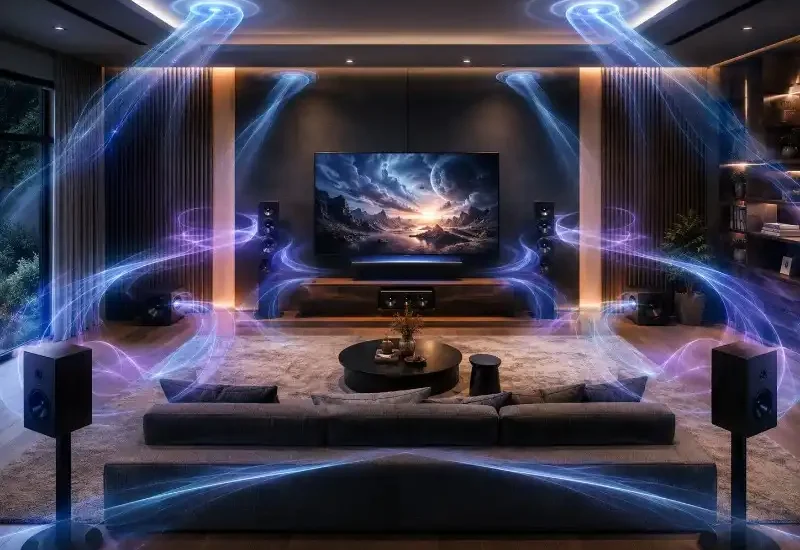
Dolby Atmos is not just about sending sound to a fixed number of speakers. It is designed as an immersive spatial audio technology, allowing sound to feel like it is moving around the listener in a more three-dimensional space. Dolby describes Atmos as a spatial audio technology built for a more immersive sound experience.
With traditional surround sound, audio is usually assigned to channels such as left, right, center, or rear surround. With Dolby Atmos, sound can be placed in a more flexible way. This makes it possible to create the feeling that audio is coming from above, beside, behind, or around you.
For example:
- Rain can sound like it is falling from above.
- A helicopter can feel like it is flying overhead.
- Crowd noise can surround the room during a sports event.
- Game effects can feel more accurately placed around the player.
- Movie explosions can feel more spacious and cinematic.
This is why Dolby Atmos is often described as 3D audio or spatial audio.
Dolby Digital vs Dolby Digital Plus vs Dolby Atmos
The easiest way to understand the difference is this:
Dolby Digital is the classic 5.1 surround sound format.
Dolby Digital Plus is the upgraded surround sound format for modern streaming and 7.1 audio.
Dolby Atmos is the immersive spatial audio format that can add height and 3D-style sound effects.
Here is a simple comparison:
| Feature | Dolby Digital | Dolby Digital Plus | Dolby Atmos |
|---|---|---|---|
| Audio Type | Channel-based | Channel-based | Object-based / spatial |
| Common Setup | Up to 5.1 | Up to 7.1 | 3D immersive audio |
| Best For | DVDs, cable TV, older systems | Streaming, smart TVs, soundbars | Premium home theater and gaming |
| Sound Experience | Traditional surround sound | Improved surround sound | Sound from around and above |
| Hardware Needed | Basic surround system | Modern TV, soundbar, or receiver | Atmos-compatible TV, soundbar, or receiver |
Which Format Sounds Better?
In most cases, Dolby Atmos offers the most immersive experience, but that does not automatically mean it will always sound better on every device.
Sound quality depends on several factors, including:
- Speaker quality
- Soundbar or receiver support
- TV audio output
- Streaming app support
- Internet connection quality
- Room size
- Speaker placement
- HDMI ARC or eARC support
A high-quality 5.1 Dolby Digital system may sound better than a cheap soundbar with weak Atmos simulation. At the same time, a good Dolby Atmos soundbar or home theater system can create a much more cinematic experience than a basic 5.1 setup.
Dolby Digital Plus usually sounds better than standard Dolby Digital when both the content and hardware support it. It is also more common on streaming platforms because it can deliver improved sound while keeping data sizes manageable.
Do You Need Dolby Digital Plus?
If you mostly watch regular TV or older DVDs, Dolby Digital may be enough. It still provides a solid surround sound experience for many users.
However, Dolby Digital Plus is useful if you watch a lot of streaming content. Many modern streaming platforms, smart TVs, and soundbars support Dolby Digital Plus because it is better suited for online delivery.
You may benefit from Dolby Digital Plus if:
- You use Netflix, Disney+, Prime Video, Apple TV+, or similar streaming apps.
- You have a modern smart TV.
- You use a newer soundbar.
- You want better surround sound than standard 5.1.
- You are setting up a 7.1 home theater system.
- You want clearer, more detailed audio from supported content.
The good news is that many newer TVs and soundbars already include Dolby Digital Plus support.
Do You Need Dolby Atmos?
Dolby Atmos is worth considering if you want a more premium home entertainment experience.
It can be especially useful for:
- Movie lovers
- Gamers
- Home theater users
- People buying a new soundbar
- Users with larger rooms
- Viewers who watch a lot of action, sci-fi, sports, or concert content
However, to enjoy Dolby Atmos properly, you need compatible hardware and supported content. That may include an Atmos-compatible TV, soundbar, AV receiver, streaming device, or speaker system.
You also need content that includes Dolby Atmos audio. Not every movie or show supports Atmos, even on major streaming platforms. Many services show a Dolby Atmos badge when the title supports it.
What Happens If Your Device Does Not Support Dolby Digital Plus or Atmos?
If your system does not support the latest audio format, the content may still play. However, it may be converted to a format your device can handle.
For example, if a movie includes Dolby Digital Plus audio but your older receiver only supports Dolby Digital, the system may output standard 5.1 surround sound instead.
This means you may not get the full benefit of the newer format, but you can still hear the movie or show. You just may not hear the extra rear channels, improved detail, or height effects.
With Dolby Atmos, unsupported systems usually play a more basic surround or stereo version of the audio.
Dolby Digital Plus and Streaming Services
Dolby Digital Plus is widely used in streaming because it balances quality and efficiency. Streaming platforms need to deliver strong audio without using too much bandwidth.
That makes Dolby Digital Plus a practical choice for smart TVs, streaming sticks, mobile devices, and browsers.
Dolby Atmos can also be delivered through Dolby Digital Plus on many streaming services. This allows users to experience immersive audio without needing extremely large audio files.
However, Atmos availability can depend on:
- Your streaming subscription plan
- The movie or show
- Your TV or soundbar
- Your streaming device
- Your HDMI connection
- Your app settings
Before upgrading your hardware, it is worth checking whether your favourite streaming apps actually support Dolby Atmos on your device.
Dolby Atmos for Gaming
Dolby Atmos can also improve gaming audio. In supported games, spatial audio can help players hear where certain sounds are coming from more accurately.
For example, footsteps, vehicles, weather, explosions, and environmental effects can feel more realistic. This can make open-world games, racing games, shooters, and cinematic adventure games more immersive.
Gamers should check whether their console, PC, headset, soundbar, or receiver supports Dolby Atmos. Some platforms may also require audio settings to be enabled before Atmos works correctly.
Dolby Atmos for Music
Dolby Atmos is not only for movies and games. It is also becoming more common in music streaming.
With Dolby Atmos music, vocals and instruments can be placed in a wider sound field. Instead of feeling like the music is only coming from the left and right speakers, it can feel more open and layered.
However, the quality of the experience depends heavily on the mix and the playback device. Some Atmos music tracks sound impressive, while others may not feel very different from standard stereo.
For casual music listening, good headphones or speakers may matter more than the audio format alone.
How to Check Which Dolby Format Your Device Supports
Before buying a new TV, soundbar, or home theater system, check the product specifications.
Look for labels such as:
- Dolby Digital
- Dolby Digital Plus
- Dolby Atmos
- HDMI ARC
- HDMI eARC
- 5.1 channel support
- 7.1 channel support
- Atmos passthrough
- Dolby Vision and Dolby Atmos support
If you are buying a soundbar, also check whether it has rear speakers or upward-firing drivers. Some soundbars support Dolby Atmos but use virtual processing instead of real height speakers.
Virtual Atmos can still improve the sound, but it may not feel as realistic as a setup with dedicated height channels.
How to Test Your Surround Sound Setup
Once your system is connected, test it with content that has strong surround sound effects.
Good test content includes:
- Action movies
- Nature documentaries
- Live concert recordings
- Sports events
- Dolby-supported streaming titles
- Games with surround audio
- Scenes with rain, aircraft, crowds, traffic, or explosions
When testing your setup, listen for:
- Clear dialogue from the center
- Sound movement from left to right
- Rear speaker activity
- Deep but controlled bass
- Height effects if using Dolby Atmos
- Balanced audio across the room
If everything sounds like it is only coming from the TV, your settings or connection may need adjustment.
Common Mistakes Buyers Make
Thinking Dolby Atmos Always Means Better Sound
Dolby Atmos can be excellent, but the speaker quality still matters. A premium 5.1 system can outperform a low-quality Atmos soundbar.
Ignoring HDMI ARC and eARC
Your TV and soundbar connection matters. HDMI ARC and especially HDMI eARC can help deliver better audio support between devices.
Using TV Speakers Only
Most TV speakers are too small to create true surround sound. To hear a real difference, a soundbar or speaker system is usually needed.
Forgetting About Supported Content
A Dolby Atmos soundbar will not create full Atmos audio if the movie, show, game, or app does not support it.
Confusing 5.1, 7.1, and Atmos
5.1 and 7.1 are channel-based surround formats. Dolby Atmos is more advanced because it can create a spatial audio effect with height and movement.
Which Dolby Format Should You Choose?
The best choice depends on your setup and budget.
Choose Dolby Digital if you have an older TV, DVD player, or basic 5.1 home theater system.
Choose Dolby Digital Plus if you use streaming apps and want better surround sound from a modern TV, soundbar, or receiver.
Choose Dolby Atmos if you want the most immersive home theater experience and are willing to invest in compatible hardware.
For most everyday users, Dolby Digital Plus is a practical upgrade. For movie lovers and gamers, Dolby Atmos is the more exciting choice.
Dolby Digital, Dolby Digital Plus, and Dolby Atmos all improve home entertainment audio, but they are built for different levels of listening.
Dolby Digital is the classic surround sound format for 5.1 systems. Dolby Digital Plus improves the experience with better compression, better quality, and support for up to 7.1 channels. Dolby Atmos goes further by creating a more immersive spatial audio experience where sound can feel like it is coming from around and above you.
If you are buying a new TV, soundbar, streaming device, or home theater system, Dolby Digital Plus and Dolby Atmos support are worth looking for. They can make movies, shows, games, and music feel more detailed, powerful, and cinematic. Better audio does not just make content louder. It makes entertainment feel more real.