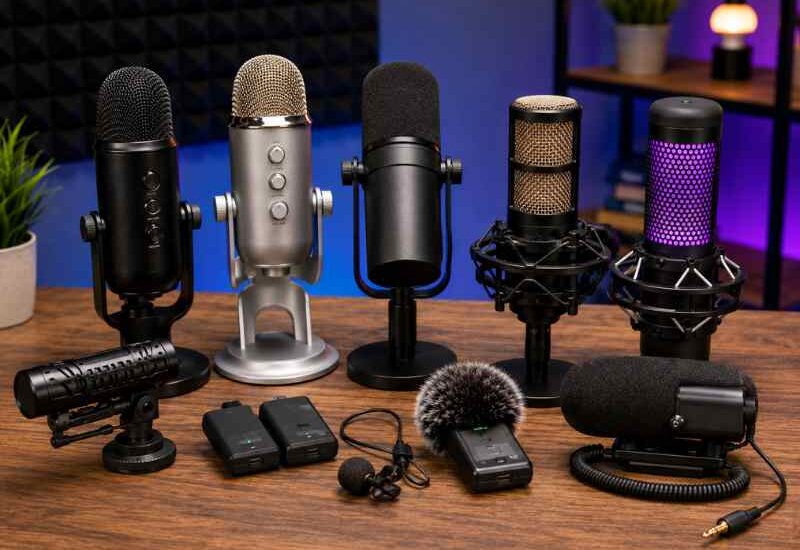
Creating great content in 2026 is no longer just about having a good camera. Whether you are uploading YouTube videos, hosting a podcast, livestreaming on Twitch, teaching online classes, or creating TikTok content, audio quality can make or break your content.
Many viewers will tolerate average video quality, but poor audio often causes people to click away within seconds. Clear, professional sound instantly makes creators appear more trustworthy, engaging, and professional.
In this guide, we’ll explore the Top Microphones for Content Creators, covering beginner-friendly USB microphones, professional XLR setups, wireless systems for vloggers, and budget options for creators starting their journey.
You’ll also learn:
- What microphone types work best for different creators
- USB vs XLR microphone differences
- Best microphones by budget
- Accessories that improve sound quality
- Audio tips used by professional creators
- Future creator audio trends in 2026
Why Audio Quality Matters More Than Ever
Platforms like YouTube, TikTok, Twitch, and podcast streaming services are now extremely competitive. Millions of creators publish content daily.
The easiest way to stand out is with better sound.
Professional audio helps creators:
- Increase watch time
- Improve audience trust
- Sound more authoritative
- Reduce listener fatigue
- Make content easier to understand
- Build stronger brand identity
Even smartphone creators are now investing in better microphones because audiences expect clean, noise-free audio.
What to Look for in a Creator Microphone
Before buying a microphone, creators should understand a few important features.
USB vs XLR Microphones
USB Microphones
USB microphones connect directly to laptops, desktops, tablets, or some smartphones.
Best for:
- Beginners
- Streamers
- Podcasters
- Online teachers
- Solo creators
Advantages:
- Plug-and-play setup
- Affordable
- No audio interface needed
Disadvantages:
- Limited upgrade flexibility
- Slightly lower audio control
XLR Microphones
XLR microphones require an audio interface or mixer.
Best for:
- Professional podcasters
- Studio creators
- Musicians
- Advanced streamers
Advantages:
- Superior sound quality
- Better customization
- Professional-grade audio
Disadvantages:
- More expensive
- Complex setup
Wired vs Wireless Microphones
Wired Microphones
Perfect for desk setups, streaming, podcasts, and studio recording.
Pros:
- Reliable connection
- No charging required
- Consistent audio quality
Wireless Microphones
Ideal for:
- Vlogging
- Interviews
- Outdoor shooting
- TikTok content
- Travel creators
Pros:
- Freedom of movement
- Portable
- Great for mobile creators
Cons:
- Battery management
- Possible interference
Audio Quality and Frequency Response
Frequency response determines how well a microphone captures voice tones.
For content creation:
- Warm vocals help podcasts
- Clear highs improve tutorials
- Balanced mids work best for YouTube videos
Creators should also check:
- Noise rejection
- Sensitivity
- Recording patterns
Noise Reduction Features
Modern creator microphones now include:
- AI noise cancellation
- Built-in DSP processing
- Background noise filtering
- Wind protection
These features are especially useful for:
- Home studios
- Café recordings
- Outdoor vlogging
- Shared workspaces
Budget Considerations
A good microphone does not always mean expensive.
Typical creator budgets:
| Creator Level | Recommended Budget |
|---|---|
| Beginner | $30–$100 |
| Intermediate | $100–$250 |
| Professional | $250–$600+ |
Different Types of Microphones for Content Creators
Lavalier Microphones
Small clip-on microphones used for:
- Interviews
- Online courses
- TikTok videos
- Public speaking
Best for mobile creators.
Shotgun Microphones
Highly directional microphones that capture sound from the front.
Best for:
- Vlogging
- Filmmaking
- Outdoor content
- Travel creators
Condenser Microphones
Extremely sensitive microphones with detailed sound capture.
Best for:
- Podcasts
- Voiceovers
- Streaming
- Studio recording
Dynamic Microphones
Less sensitive and excellent at rejecting background noise.
Best for:
- Loud environments
- Gaming streams
- Home studios
USB Microphones
Simple all-in-one creator microphones.
Perfect for:
- Beginners
- Streamers
- Remote workers
Wireless Microphone Systems
Portable systems with transmitters and receivers.
Best for:
- YouTube creators
- TikTokers
- Mobile filmmaking
Top 10 Microphones Every Content Creator Should Consider
1. Shure MV7
Overview
One of the best hybrid microphones for creators. Inspired by the legendary SM7B, the MV7 offers both USB and XLR connectivity.
Key Features
- USB + XLR support
- Built-in touch controls
- Auto-level mode
- Excellent vocal clarity
Pros
- Professional sound
- Great for podcasts
- Future-proof setup
Cons
- Higher price
- Requires tuning for best results
Best Use Cases
- Podcasting
- YouTube voiceovers
- Professional streaming
Best Creator Type
Professional creators and serious podcasters.
Price Range
$240–$300
2. Blue Yeti
Overview
A legendary USB microphone that remains popular among beginner and intermediate creators.
Key Features
- Multiple pickup patterns
- USB plug-and-play
- Strong desktop performance
Pros
- Easy setup
- Versatile recording modes
- Good voice quality
Cons
- Sensitive to room noise
- Large desk footprint
Best Use Cases
- YouTube
- Streaming
- Online teaching
Price Range
$100–$140
3. Rode Wireless GO II
Overview
A compact wireless microphone system designed for creators on the move.
Key Features
- Dual-channel recording
- Built-in storage
- Compact transmitter
- Long wireless range
Pros
- Ultra portable
- Excellent for vlogging
- Reliable wireless performance
Cons
- Premium pricing
- Requires charging
Best Use Cases
- Travel vlogging
- TikTok videos
- Interviews
Price Range
$250–$320
4. DJI Mic 2
Overview
One of the most advanced wireless microphones for creators in 2026.
Key Features
- AI noise reduction
- 32-bit float recording
- Touchscreen receiver
- Internal recording
Pros
- Outstanding mobile workflow
- Excellent noise handling
- Compact design
Cons
- Expensive
- Learning curve for advanced features
Best Use Cases
- Professional YouTubers
- Mobile filmmaking
- Outdoor creators
Price Range
$300–$400
5. HyperX QuadCast S
Overview
A stylish microphone designed specifically for gaming and streaming creators.
Key Features
- RGB lighting
- Anti-vibration shock mount
- Tap-to-mute sensor
Pros
- Great streaming aesthetics
- Good voice clarity
- Beginner-friendly
Cons
- RGB not useful for everyone
- Picks up room echo
Best Use Cases
- Twitch streaming
- Gaming content
- Live streaming
Price Range
$120–$170
6. Audio-Technica AT2020
Overview
A classic condenser microphone trusted by musicians and creators worldwide.
Key Features
- Studio-quality audio
- Excellent vocal detail
- Durable build
Pros
- Professional-grade sound
- Great for voiceovers
- Excellent value
Cons
- Requires audio interface
- Sensitive to background noise
Best Use Cases
- Studio recording
- Voice acting
- Podcasting
Price Range
$100–$150
7. Elgato Wave:3
Overview
Designed specifically for modern content creators and streamers.
Key Features
- Clipguard technology
- Digital mixer software
- USB-C connectivity
Pros
- Excellent creator software
- Clean streaming audio
- Compact design
Cons
- Limited physical controls
- Software optimized mainly for streamers
Best Use Cases
- Livestreaming
- Gaming
- YouTube content
Price Range
$130–$170
8. Sony ECM-G1
Overview
A compact camera-mounted microphone perfect for vloggers.
Key Features
- Lightweight design
- Wind protection
- Camera compatibility
Pros
- Excellent portability
- Better outdoor sound
- Easy camera integration
Cons
- Limited indoor performance
- Smaller sound profile
Best Use Cases
- Vlogging
- Travel videos
- Outdoor shooting
Price Range
$120–$180
9. Sennheiser MKE 400
Overview
A premium directional microphone for creators needing cleaner camera audio.
Key Features
- Built-in windscreen
- Low-cut filter
- Compact form factor
Pros
- Excellent directional audio
- Durable
- Great outdoor performance
Cons
- Higher cost
- Requires camera mounting
Best Use Cases
- Documentary content
- Outdoor YouTube videos
- Interviews
Price Range
$180–$250
10. FIFINE K669B
Overview
One of the best entry-level microphones for beginner creators.
Key Features
- USB plug-and-play
- Simple controls
- Affordable pricing
Pros
- Extremely budget-friendly
- Easy setup
- Good starter quality
Cons
- Limited professional features
- Plastic build
Best Use Cases
- Beginner YouTubers
- Students
- Entry-level streaming
Price Range
$30–$50
Quick Comparison Table
| Microphone | Best For | Type | Price |
|---|---|---|---|
| Shure MV7 | Podcasting | USB/XLR | $$$ |
| Blue Yeti | Beginners | USB | $$ |
| Rode Wireless GO II | Vlogging | Wireless | $$$ |
| DJI Mic 2 | Mobile creators | Wireless | $$$$ |
| HyperX QuadCast S | Streaming | USB | $$ |
| AT2020 | Studio recording | XLR | $$ |
| Elgato Wave:3 | Streamers | USB | $$ |
| Sony ECM-G1 | Vlogging | Shotgun | $$ |
| Sennheiser MKE 400 | Outdoor creators | Shotgun | $$$ |
| FIFINE K669B | Budget creators | USB | $ |
Best Microphones by Creator Type
Best for YouTubers
- Shure MV7
- DJI Mic 2
- Rode Wireless GO II
Best for TikTok Creators
- DJI Mic 2
- Rode Wireless GO II
- Sony ECM-G1
Best Podcast Microphones
- Shure MV7
- Audio-Technica AT2020
- Blue Yeti
Best Streaming Microphones
- HyperX QuadCast S
- Elgato Wave:3
- Shure MV7
Best Travel Vlogging Microphones
- Sennheiser MKE 400
- Sony ECM-G1
- DJI Mic 2
Best Beginner Creator Microphones
- FIFINE K669B
- Blue Yeti
- Elgato Wave:3
Best Professional Creator Microphones
- Shure MV7
- DJI Mic 2
- Sennheiser MKE 400
USB vs XLR Microphones: Which Should You Choose?
| Feature | USB | XLR |
|---|---|---|
| Setup | Easy | Complex |
| Cost | Lower | Higher |
| Audio Quality | Good | Excellent |
| Upgrade Options | Limited | Extensive |
| Streaming Ready | Yes | Requires interface |
| Beginner Friendly | Very | Moderate |
Choose USB If:
- You are new to content creation
- You want simple setup
- You stream or podcast casually
Choose XLR If:
- You want professional audio
- You plan long-term upgrades
- You record in a studio environment
Best Budget Microphones by Price Range
Best Under $50
- FIFINE K669B
Best Under $100
- Audio-Technica AT2020
- Blue Yeti (often discounted)
Best Under $200
- Elgato Wave:3
- HyperX QuadCast S
Premium Creator Microphones
- Shure MV7
- DJI Mic 2
- Rode Wireless GO II
Best Value-for-Money Microphone
- Shure MV7
It offers both USB and XLR flexibility, making it ideal for growing creators.
Essential Microphone Accessories
Pop Filters
Reduce harsh “P” and “B” sounds.
Best for:
- Podcasts
- Voiceovers
Shock Mounts
Prevent desk vibrations and keyboard noise.
Boom Arms
Improve microphone positioning and free desk space.
Audio Interfaces
Necessary for XLR microphones.
Popular beginner interfaces:
- Focusrite Scarlett series
- Elgato XLR Dock
Windscreens
Reduce outdoor wind noise.
Essential for:
- Travel vloggers
- Mobile creators
Portable Audio Recorders
Useful for:
- Field interviews
- Documentary creators
- Outdoor content
Tips to Improve Audio Quality for Content Creation
Position Your Microphone Correctly
Keep the microphone:
- 6–12 inches from your mouth
- Slightly off-axis
- Consistent distance away
Reduce Background Noise
Turn off:
- Fans
- Air conditioners
- Mechanical keyboards
- Echo-heavy appliances
Improve Room Acoustics
Simple improvements include:
- Curtains
- Carpets
- Foam panels
- Soft furniture
Record in a Quiet Environment
Even expensive microphones sound bad in noisy rooms.
Use Audio Editing Software
Popular creator tools:
- Adobe Audition
- Audacity
- DaVinci Resolve Fairlight
Improve Voice Clarity
- Speak clearly
- Slow down naturally
- Stay hydrated
- Avoid clipping and distortion
Future Trends in Creator Audio Technology
AI-Powered Noise Cancellation
Modern microphones now remove:
- Traffic noise
- Keyboard sounds
- Room echo
- Wind interference
AI audio cleanup is becoming standard in 2026 creator tools.
Smart Microphones
Future microphones increasingly include:
- Auto gain adjustment
- Voice enhancement
- Built-in DSP
- App-controlled sound profiles
Wireless Creator Ecosystems
Brands are creating connected creator ecosystems where microphones, cameras, and editing tools work together seamlessly.
Portable Creator Studios
Compact creator kits now allow creators to record:
- Podcasts
- YouTube videos
- Interviews
- Livestreams
From almost anywhere.
Choosing the Top Microphones for Content Creators depends on your content style, budget, recording environment, and long-term goals.
Beginner creators do not need expensive studio gear immediately. A good USB microphone can dramatically improve content quality compared to built-in laptop or smartphone microphones.
As your audience grows, upgrading to advanced wireless systems or professional XLR setups becomes worthwhile.
The most important thing is consistency. Great audio helps creators build trust, improve audience retention, and create a more professional brand presence across platforms.
Whether you are starting your first TikTok channel or launching a professional podcast, investing in quality sound is one of the smartest creator upgrades you can make.